What makes a KPI business-specific?
A useful target reflects the business model and the decision being made. An engineering consultancy seeking a few complex enquiries should not copy the lead-volume expectations of a business selling many short appointments. The metric can have the same definition while the appropriate target differs. SharkBlade supports business-specific targets and thresholds for supported KPIs. That is different from inventing a new metric, editing any scoring formula, or freely changing category weights. Before adjusting a target, confirm the supported field, its direction and the reporting period in the workspace.
Write a target agreement before changing a setting
| Field | Example agreement |
|---|---|
| Business objective | Increase suitable consultation enquiries |
| Metric | Unique new inbound leads, using the supported definition |
| Scope | One workspace and a completed calendar month |
| Starting evidence | Saved previous-period value and coverage |
| Target rationale | Capacity, recent comparable activity and business objectives |
| Review rule | Annotate changes; preserve the old basis for interpretation |
Do not configure a target merely to make the score look stronger. If a target is relaxed while the raw lead count stays unchanged, the assessment may improve without additional demand. The report should explain that difference before anyone describes it as marketing growth.
A worked target-setting conversation
Consider a hypothetical specialist supplier with 12 enquiries last month. The delivery team can review 20 well-matched enquiries, but half the existing requests concern services it does not offer. A sensible first decision may be improving service clarity and qualification rather than demanding 40 submissions. Keep the enquiry count and the qualification review separate. SharkBlade’s captured records can help inspect supplied source and identity information. A claim that enquiries became opportunities or contracts needs verified downstream evidence. A target of 15 enquiries in this example is an illustrative business decision, not an industry benchmark or a default SharkBlade setting.
Read the score with its evidence
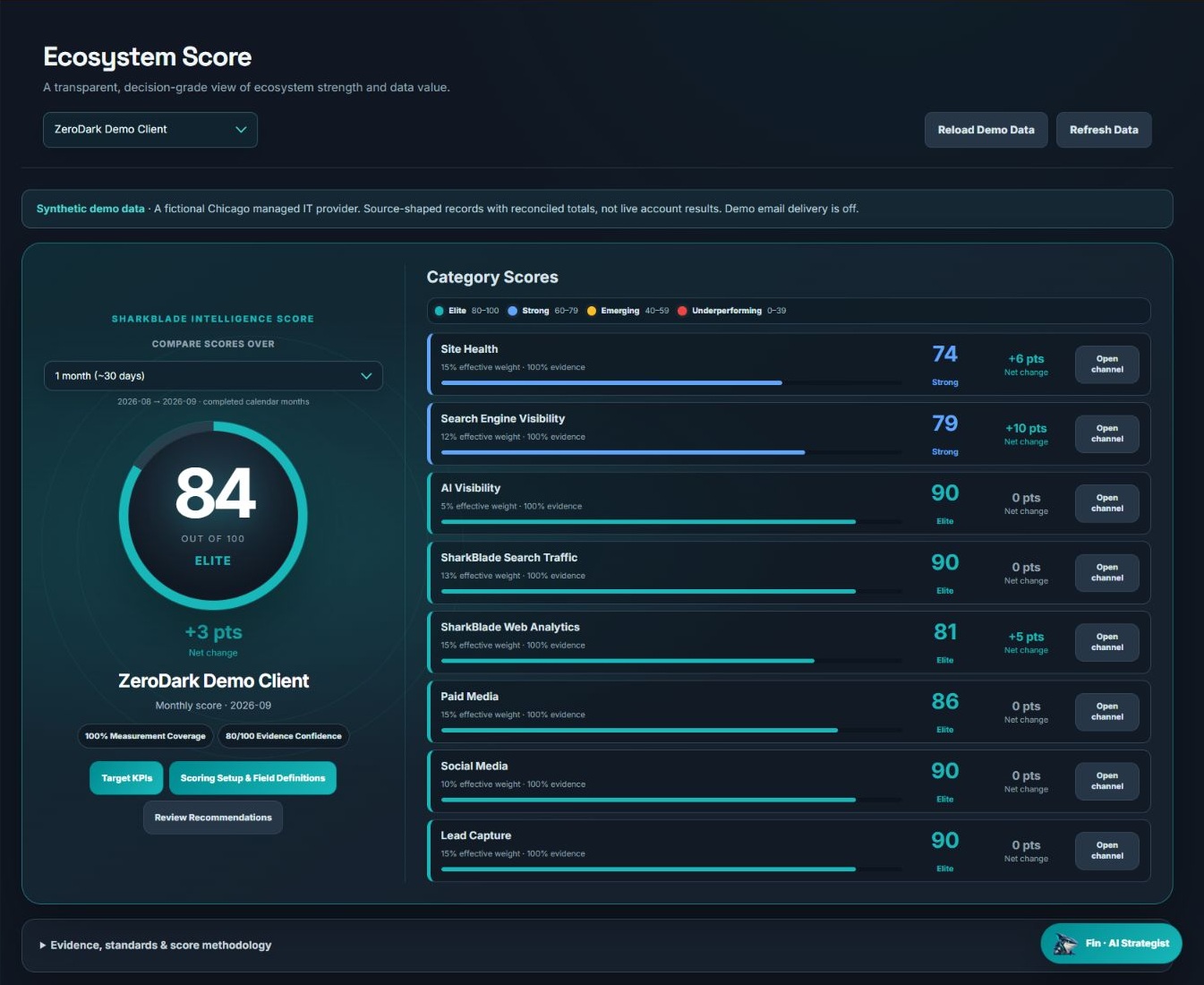
The actual demo score screen shows Target KPIs and Scoring Setup & Field Definitions alongside category scores. Use that sequence: inspect the measure, understand the assessment, and then decide whether a target remains appropriate. The demo’s 84/100 overall score is synthetic, not a performance standard for every company.
Keep target changes auditable
- Record the old and new target, the effective month and the reason for the change.
- Separate a collection repair from a real movement in performance.
- Compare raw values as well as scores when a target or measurement scope changes.
- Review targets when the offer, market, sales capacity or data definition changes—not whenever a result is uncomfortable.
The useful outcome is an assessment the business can explain and act on. For the underlying metric definitions, use the B2B KPI reference; for interpreting a score as a whole, use the scoring walkthrough.